git-reap: deleting old branches and the worktrees sitting on them
I wrote git-reap because
git branch --merged | xargs git branch -d in my dotfiles stopped being enough.
It didn’t handle branches that aren’t merged but are finished anyway, and
worktrees. I also wanted a clean interface, which many of the other “git
cleanup” alternatives don’t provide.
Worktree cleanup became important when I started using agents more. Claude Code
and similar tools leave detached worktrees under .claude/worktrees, and they
accumulate quietly. A worktree also pins the branch it has checked out, so git
refuses to delete that branch — which means a branch-only cleanup can’t finish
the job.
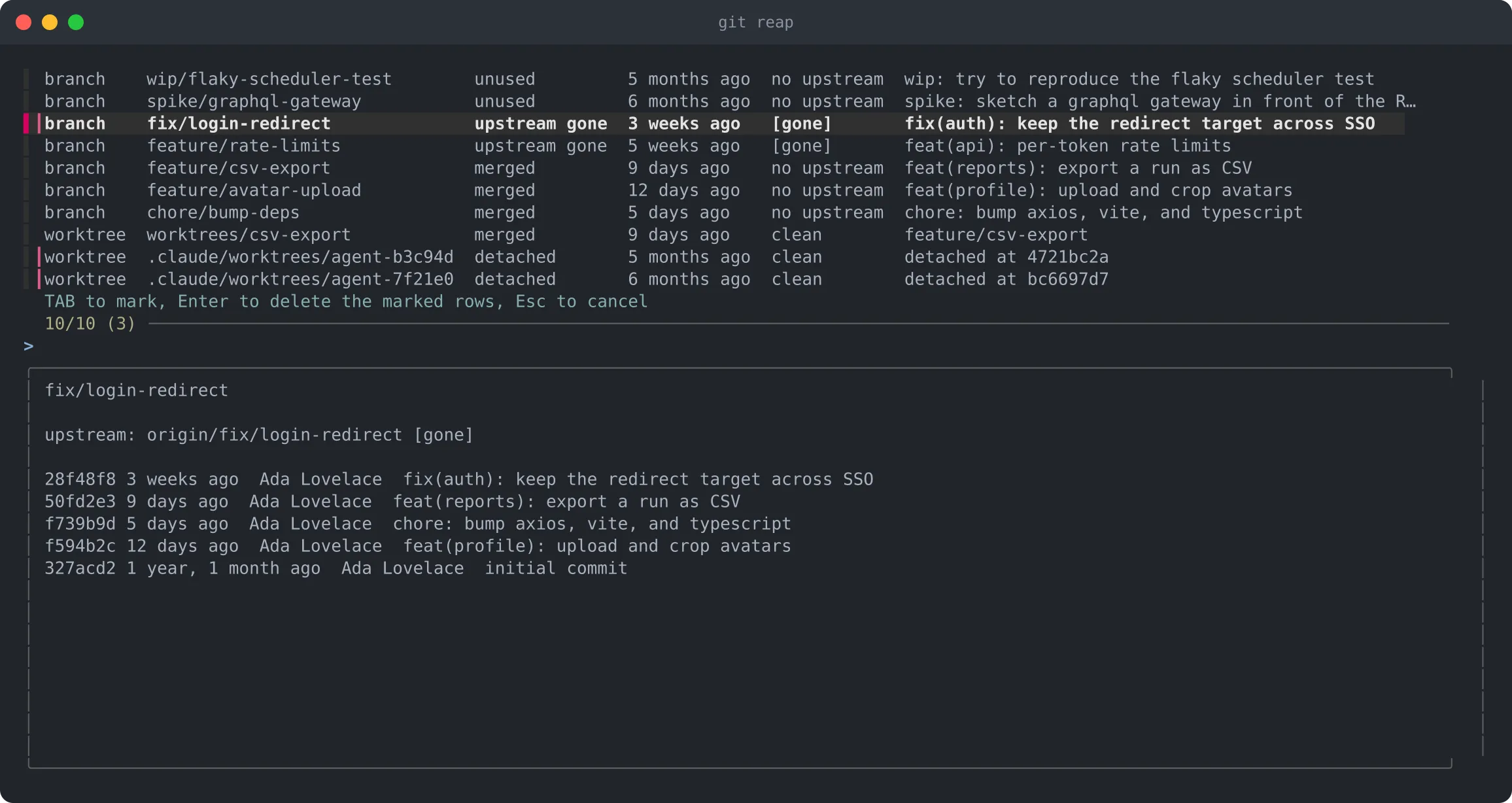
git reap finds four kinds of leftovers in one pass, shows you what it found,
and deletes only what you mark. I particularly like the integration with fzf
to provide a clean, clear way to select what to clean up.
What it considers dead
| Reason | What it means |
|---|---|
merged | already contained in the base branch |
upstream gone | the remote branch was deleted — what a squash-merged PR leaves |
unused | no commits in the last --days days (90 by default) |
detached | a clean worktree on a detached HEAD, idle for --days days |
Detached worktrees are matched by age, not by path, so it doesn’t care where your agent tooling puts them. Worktrees are removed before branches, for the reason above.
Never touched: the base branch, the branch you’re on, the branch the main worktree holds, the main worktree itself, and any worktree that’s locked, dirty, or currently in use.
Using it
Install:
go install github.com/m-d-brown/git-reap@latestAnything named git-reap on your PATH is reachable as git reap, so that’s
the whole installation. fzf drives the
picker; without it, --dry-run and --all still work.
git reap                # pick through the candidates
git reap -n             # just look, and see what was skipped and why
git reap -a -y          # take everything, no questions
git reap -d 30          # count a month of silence as unused
git reap develop        # measure "merged" against develop
TAB marks a row, Enter deletes what’s marked, Esc walks away. The preview pane shows the recent history of whatever the cursor is on, which is usually enough to remember what a six-month-old spike branch was for.
--dry-run also reports its omissions, which is where the interesting
information tends to be:
worktree  worktrees/csv-export            merged    9 days ago    clean        feature/csv-export
worktree  .claude/worktrees/agent-7f21e0  detached  6 months ago  clean        detached at 1baafd65
branch    chore/bump-deps                 merged    5 days ago    no upstream  chore: bump axios, vite, and typescript
kept    worktree /src/checkout-service/.claude/worktrees/agent-e5a018 (detached but recent)
A couple of implementation notes
Each run starts with git fetch --prune. That’s what makes [gone] mean
anything: until the remote refs are pruned, a branch whose upstream was deleted
still looks alive. --no-fetch skips it when you’re offline.
Merged branches are deleted with git branch -d, so git gets the last word.
upstream gone and unused branches aren’t merged as far as git is concerned,
so those need -D. A branch that’s both merged and idle is reported as merged,
since that’s the gentler of the two.
Source and issues at github.com/m-d-brown/git-reap.