Improving Unifi operability with Proxmox using lldp
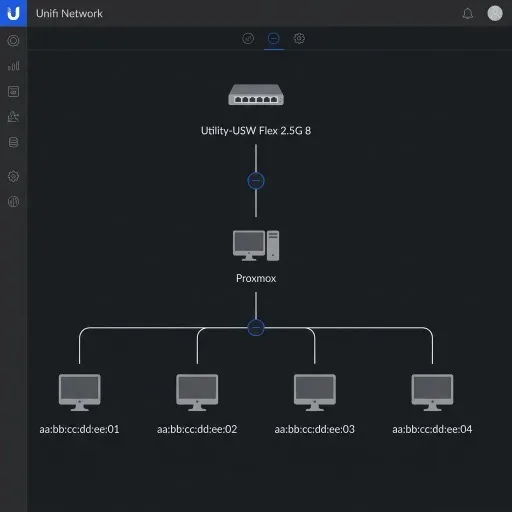
If you run Proxmox and use Unifi networking equipment you might have noticed that Unifi’s topology map doesn’t always accurately show which switch ports your Proxmox hosts are connected to. In my case, ports connected to Proxmox hosts providing multiple VLANs weren’t even showing up as connected.
To fix this, you can install the Link Layer Discovery Protocol (LLDP) daemon
(lldpd) on your Proxmox hosts. lldpd allows the host to broadcast its
network topology information, helping network controllers like Unifi correctly
map and display the switch ports the host is connected to.
Install lldpd
You can install lldpd on your proxmox hosts using Ansible:
- name: Setup Proxmox Hosts
  hosts: proxmox
  become: true
  tasks:
    - name: Ensure lldpd is installed
      ansible.builtin.apt:
        name: lldpd
        state: present
        update_cache: true

    - name: Ensure lldpd is enabled and started
      ansible.builtin.service:
        name: lldpd
        state: started
        enabled: true
Or install directly on the proxmox host:
sudo apt install lldpd
sudo systemctl enable --now lldpd
Verifying discovery
Once lldpd is running, you can verify using the lldpcli tool. Running
lldpcli show neighbors will list the directly connected devices. Here is an
example output showing that the host has discovered a Unifi switch
(Utility-USWFlex25G8) on its physical interface nic0:
root@prox:~# lldpcli show neighbors
-------------------------------------------------------------------------------
LLDP neighbors:
-------------------------------------------------------------------------------
Interface:    nic0, via: LLDP, RID: 2, Time: 0 day, 00:24:16
  Chassis:
    ChassisID:    mac 12:34:56:78:9a:bc
    SysName:      Utility-USWFlex25G8
    SysDescr:     USM25G8 - 10 GE, 2.1.8.971
  Port:
    PortID:       local Port 5
    PortDescr:    Port 5
    TTL:          120
-------------------------------------------------------------------------------
...
The Proxmox host clearly sees it is connected to Port 5 of the Utility-USWFlex25G8 switch. Unifi uses this same broadcasted information to accurately map the topology in your dashboard.
Unifi Dashboard Topology View
With lldpd running on your Proxmox hosts, the Unifi Network application
topology view should now show the Proxmox hosts as an intermediate node, with
children VMs or containers below it.